A person Searches “Urgent Care Near Me” Near You | This person is hurting and looking to get relief now, He/She/They are reviewing the first three results (no matter how many there might be) on Google Maps, and if your clinic is not in one of them – you have lost this new patient to a competitor who might be providing worse services than you, but better management of their profile.
This is the reality of urgency in 2026, regarding Urgent Care Marketing: Your Google Business Profile (GBP) is now more than just an online listing. It has now become your clinic’s front door via the Internet, and every time you make an update (or do not make an update), it sends a + or – signal to Google’s Local Ranking algorithm.
What Google Actually Looks at When Ranking Urgent Care Clinics
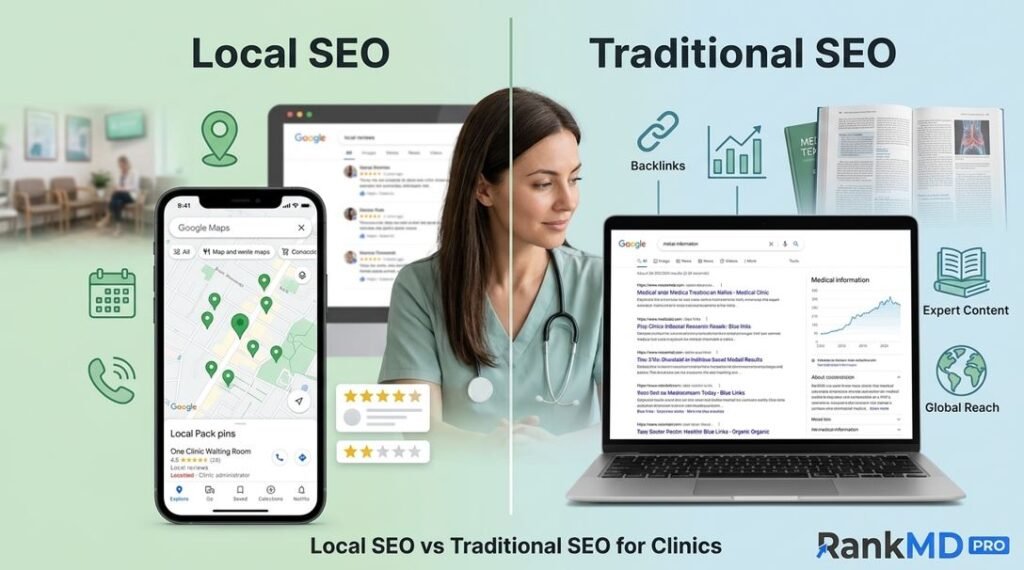
Google uses three primary pillars to determine the Urgent Care Clinics that appear within the Local Pack: Relevance to the Service/Searched Item, Distance, and Prominence. Distance cannot be changed; however, relevance and prominence are entirely in your control through effective management of your GBP.
Relevance tells Google how relevant your profile is, in reference to the service searched for. Prominence tells Google how reputable and well-established your company is in the Local Community. Relevance and prominence are primarily driven by the management of your GBP consistently and effectively.
The results of the 2026 Local Search Ranking Factors show that the primary GBP category remains the number one factor affecting local pack rankings. In terms of which category you should choose as your primary for urgent care, it should be “Urgent Care Center,” not “Medical Clinic” or “Health Clinic.” This one difference is how you wind up being listed in the highest intent searches within your area.
Why Urgent Care Searches Are Different From Other Medical Searches
There is a definite difference in the intent of the person searching for urgent care compared to someone searching for other medical services. There’s no shopping happening when someone types “urgent care near me” into Google; they have a sprained ankle, a feverish child, or a cut that will need stitches. These folks need urgent treatment, and Google understands that.
In other words, urgent care is one of the highest-stakes categories in terms of local healthcare marketing, with a patient decision-making cycle being minutes, not days. Therefore, the best time to have your profile completely optimized is before it’s needed, not after facing the reality of a big drop in your ranking.
How Google’s Algorithm Weighs GBP Activity Signals
Google’s artificial intelligence algorithm has changed significantly in the past couple of years; it used to be that you could set up a static profile once and leave it alone, which was a fairly reliable option. This is no longer possible.
The 2026 Local Reporting Ranking Factors Overview shows that real-time business activity signals, such as Google Posts, Revised Offers, and Active Messaging, are how Google is able to determine if a Company is actively engaged with its customers and actively participating in the economy. A Company that updates its profile every week, responds to Customer Reviews within 24 hours of receiving them, and continues to keep their Operating Hours current will send dozens of unique signals to the Algorithm each month, as opposed to a Clinic that has not updated their Profile Since 2023, which would essentially have no signals to report.
The Specific GBP Updates That Move the Needle for Urgent Care
Not all GBP updates will help improve ranking positions. The most efficient use of your time and money is to differentiate between GBP updates that directly affect rankings and good business hygiene practices.
NAP Consistency Across All Platforms
A consistent Name, Address, and Telephone number is the cornerstone for establishing trust with the Google Algorithm. You can consider NAP data to be your Company’s digital fingerprint, since when there is a discrepancy between the way your Company is listed in one or more directories, this creates trust issues for the Algorithm.
Consistency in your NAP data across citation sources will increase your business’s chance of appearing in the local pack by 40 percent (research indicates). The key directories for urgent care clinics include: Google Business Profile, Healthgrades, WebMD, Zocdoc, Yelp, Facebook, Apple Maps, and Bing Places. Performing a quarterly NAP audit on these listings is critical for ranking – it is not optional maintenance.
As an example of how a NAP audit can affect ranking performance, a family practice located in New Jersey performed a NAP audit and corrected 14 listings that had inaccurately listed city, address, and phone number in directories. Within 90 days, without spending any money on paid ads, they went from page three of the Map Pack for their target keyword to position four. Correcting the GBP took them roughly three hours; however, the results of the audit compounded month after month.
Photo Volume and Quality as a Trust Signal
Most urgent care clinics consider photos to be low-priority. This is a serious competitive shortcoming. According to data from digital marketing agencies that specialize in urgent care marketing, the number of photos listed on an urgent care clinic’s website is a significant trust signal – clinics with 50 or more photos rank 40 percent higher than those with fewer than 10 photos (as does the quality of the photographs).
Photo quality is as important for local SEO as photo quantity. Stock photos do not help Google identify where you are located or what you do. Using authentic photos of your waiting room, exam room, signs, your employees working, and equipment demonstrates to the search engines what local SEO experts refer to as entity authority. Google can now utilize artificial intelligence to examine and verify the authenticity of the photos you provide to prove that you are indeed at the address you claim to be at, and your business is actively conducting business there.
Be sure to upload at least one new photo weekly. If you do not have access to professional photography, a good-quality, well-lit image will prove to algorithms that you are continuing to perform business. Even if it is simply a picture of the front of the building, an image of your equipment or employees will indicate you are continuing to perform business.
Services and Attributes Completeness
The services section of your GBP is viewed by Google as another signal of relevance, and based on the number and type of services you list on there, most urgent care clinics have left the services section (attributes section) half-empty. By utilizing keywords like flu shots, COVID testing, X-ray services, occupational health, laceration repair, and pediatric urgent care, you create a relevant keyword signal for Google to read when sending patient results for searches matching up to your profile.
The attributes section of the GBP also acts as a signal for Google and filters for patients when selecting which providers they will see. Attributes like wheelchair access, LGBTQ+ friendly, walk-in appointment, online check-in, etc., give the potential patient an indication of your facility’s general additional characteristics/amenities. If your clinic offers any of these and you have not included them in your attributes section, you will be invisible to potential patients performing searches using the above attributes.
How Review Signals Have Become a Rankings Multiplier
In 2023, the weight of reviews increased 4 percentage points just within local pack rankings to 20% per the latest Local Search Ranking factors survey. This increase is one of the greatest algorithm shifts happening currently in local SEO.
The implication for the urgent care industry is clear: managing reviews has shifted from merely focusing on reputation management and is now focused on search engine optimization (SEO).
Review Volume, Velocity, and Rating Thresholds
When it comes to competing in the local pack results for urgent care, it is clear that a practice that ranks in the top three typically will have 80 to over 200 reviews with an average star rating of at least 4.3. However, just counting the number of reviews is not the whole story.
The velocity of reviews is just as important as the volume of reviews. When a new practice gets two to three reviews per week, that is a signal of active patient engagement to Google. Practices that may have many more total reviews may not have had any new reviews in the last few months, while other practices may have significantly fewer total reviews but have several new reviews in the last few weeks, and will outrank the practice with a significantly greater volume of total reviews. Freshness of reviews is also considered an individual ranking factor among the many factors considered by Google.
Responding to Reviews as an Algorithm Signal
Responding to all reviews, whether positive or negative, is just a good practice in communicating with patients and includes letting Google know the business is active and engaging with their patients and customers. Based on various local SEO frameworks, not responding to reviews gives the impression of an inactive profile, which will eventually damage your ranking position.
When responding to negative patient experiences at urgent care facilities, it is extremely important to remain compliant with HIPAA. Do not confirm or acknowledge the specifics of a patient’s visit in a public response. Keep your responses general and focused on your dedication to providing quality care. Provide an option to continue the conversation privately and offer to make a direct phone call.
Building a Review Generation System That Works
The simplest and most successful review generation method for urgent care facilities is to ask patients when they are experiencing the highest level of satisfaction, which will typically be shortly after their visit, to support and resolve their reason for coming into your clinic. Sending a follow-up text with a direct link to your Google review page, within two hours after the patient leaves your clinic, will outperform email campaigns for generating reviews by a significant margin.
At RankMD Pro, we have witnessed urgent care centres grow from 23 to more than 150 reviews in under four months of utilizing only this method, and as a result, they have had increases of two to three local pack position jumps.
GBP Posts and the Active Profile Penalty
Many urgent care providers are often unaware that an inactive GBP can negatively affect your rankings. The longer the gaps of inactivity on your profile, the more indication Google has that your practice is either reducing hours of operation, closed, or unreliable. This is extremely relevant if a patient is attempting to find an urgent care clinic, as they will try to do so knowing they can go to you right now.
One way to resolve this is to publish GBP posts on a weekly basis. By doing this, you can make your profile appear updated to both Google and any potential patient who is viewing your profile prior to coming to you for their urgent care needs.
What to Post and How Often
Examples of post formats for Urgent Care Clinics that can be successful are seasonal health alerts (i.e., flu season reminders or allergy season tips), promotional posts (i.e., highlighting you now offer digital x-ray results), or operational/office hours (i.e., extended hours during the holidays). Each post should contain an explicit call to action, a keyword (inherently relatable to the content of the post), and a good-quality photo/image. Since postings are only visible for 7 days before you need to post again, the standard recommendation from urgent care SEO experts is to have a cadence of weekly posting (as posting on a less frequent basis would not provide Google and/or potential patients with evidence of your practice’s active GBP).
The Q&A segment of your GBP has untapped potential. Start by populating it with questions patients routinely ask – Do you accept walk-ins? What kinds of insurance do you accept? How long will it take for me to be seen? Providing this type of information creates indexed content that shows up in search engines, and if there are no questions posted, this indicates to Google’s algorithm that you are not being active.
How AI Overviews Have Changed the Local Search Landscape for Urgent Care
Since AI Overviews have become prevalent, the urgent care search landscape has changed dramatically over the past year. AI Overviews are found at the top of over half of all healthcare-related searches from patients. Therefore, urgent care clinics now face both a challenge and an opportunity. The challenge is that, for example, the majority of traffic-driving queries, such as “where to go for urgent care,” now result in the answer being produced within Google’s interface, without a click being made. On the other hand, if your GBP includes your clinic’s description, services, reviews, and/or posts, this data is used by Google to generate an AI Overview answer when someone conducts a local health search.
Optimizing Your GBP Description for AI Extraction
The business’s description should begin with the answer to the question “What is offered at this UCC?” It should contain your main services, your differentiating factors, where you are located, and your patient experience promises. Make sure that the description is written in full, natural sentences that do not have excessive keywords, but rather provide clear and complete information about your UCC. Google’s AI Overviews come from structured profile content that is clearly written. Descriptions that feel like a true description of your UCC will do better when extracted by AI than those that merely compile keywords together into a list.
Common GBP Mistakes That Hurt Urgent Care Rankings
A multitude of UCC profiles were reviewed, and there are common mistakes that perennially surface in those clinics that are outside of the local pack.
Hours That Do Not Reflect Reality
Inaccurate business hours are an excellent way to ruin local rankings, along with the trust of your patients. If a patient goes to your clinic and gets there in enough time to find a closed practice, then that results in a negative review and a lost patient. Google monitors the user experience about business hours and incorporates any associated negative experience in determining the local clinics’ prominence score. It is a great idea to set your holiday hours in advance. The special hours feature on GBP can greatly limit confusion on major holidays.
Wrong or Missing Primary Category
Using Medical Clinic as the primary category instead of Urgent Care Center is an error that can limit your clinic’s visibility for every high-intent urgent care search around you. One minor change like this has taken clinics in competitive markets from the second page of Google to make it into the local pack just with a simple update. To better represent your clinic in GBP, include secondary categories that represent the services you provide; for example, occupational health, pediatrics, sports medicine, or physical therapy, depending on the scope of your practice.
Ignoring the Booking and Messaging Features
With GBP now supporting direct appointment booking links and messaging patients, clinics that implemented these features have seen their engagement rates in their listing increase significantly, and engagement is a ranking signal. The total number of clicks through to your clinic from your profile, the number of direction requests, and clicks on your phone number will all contribute to your prominence score.
If possible, link your online check-in system or appointment booking to your GBP listing and turn on messaging to fax at least respond to customers within a couple of hours (preferably faster). The accumulated signals of the above types of behaviors will, over time, add up to make ranking improvements that will be substantial.
A Step-by-Step GBP Optimization Checklist for Urgent Care Clinics
RankMD Pro audits and optimizes an urgent care GBP profile for local pack inclusion by following these exact steps:
- Verify that your profile has been claimed and fully verified, as well as confirm that your primary category is “Urgent Care Center.”
- Verify that there is no keyword stuffing in the Business Name section, as Google may penalize you for this.
- Confirm that your address and phone number are both the same on your website and all major directories (internet directories).
- Upload between 25 and 30 pictures in total across the following categories: exterior, interior, team, and equipment.
- Write a business description or rewrite your business description by using natural integration of keywords and an overall patient-first tone.
- List all services offered, providing in-depth descriptions of each.
- Make sure to complete each applicable attribute.
- Turn on booking links and messaging.
- Provide at least one update weekly.
- Respond to every review currently posted.
- Implement a review generation process for post-visit follow-up.
- Conduct an audit of your NAP data against the top 10 healthcare directories.
- Repeat the audit every 90 days.
By following the above-mentioned guidelines and maintaining consistency, you will be able to distinguish yourself from other clinics in the top 3 results vs. other clinics hovering close by!
Frequently Asked Questions
How often should I update my Google Business Profile for urgent care?
Update at least once a week, and do a full profile audit every 90 days; update hours whenever there is a change.
Is responding to Google reviews beneficial for improving my search rankings?
Yes. When you respond to Google reviews, it shows that you are engaged with Google, which helps to improve your local ranking/visibility.
What is the important category for an urgent care clinic’s Google Business Profile?
Your primary category for an urgent care clinic is going to be “Urgent Care Center.” According to the 2026 Local Search Ranking Factors report, this is the most significant factor in determining the visibility of an urgent care clinic in the local pack.
How many photos do I need for my urgent care center’s Google Business Profile?
Make sure to have at least 50 photos on your Google Business Profile; clinics with at least 50 photos have better local SEO performance than clinics with fewer than 10 photos.
Will inconsistent NAP information affect my urgent care center’s local rankings?
Yes, having different names, addresses, or phone numbers listed in different directories decreases your local authority and, therefore, your ability to appear in the Local Pack.
How will AI-generated overviews affect how visible my urgent care center is to patients?
AI-generated overviews will use the information from your Google Business Profile to answer a patient’s local health search. For your clinic to be cited in AI-generated responses, you must have an accurate and complete account of your business listed in your Google Business Profile.