Service area pages are a powerful tool for walk-in clinics looking to attract local patients. They help your facility show up in search results for nearby cities and towns, even if your physical location is based in a neighboring area. However, many healthcare marketers make a costly mistake: they duplicate the exact same page over and over, changing only the city name.
This practice results in “thin content.” Thin content offers zero real value to visitors and can actually hurt your urgent care SEO rankings. Google prioritizes pages that are helpful, unique, and designed to answer genuine patient questions. To rank well and convert visitors into walk-in patients, every service area page on your website needs specialized urgent care search engine optimization.
What Is a Service Area Page?
A service area page is a location-focused webpage designed to target prospective patients in a specific city, town, or neighborhood. It lets local residents know that your medical facility is ready to serve them, even if they live a few miles away from your primary building.
For instance, if your clinic is located in City A, you likely serve patients living in neighboring City B and City C. Creating dedicated service area pages for City B and C allows you to show up in local SEO for urgent care searches when people in those areas search for nearby medical help.
What Is Thin Content?
Thin content refers to web pages that have very little substance, low-quality information, or duplicate text copied from other pages on the site. A classic example of thin content in healthcare SEO looks like this:
-
Urgent Care in City A
-
Urgent Care in City B
-
Urgent Care in City C
When all three of these pages feature identical text—with only the city name swapped out—Google flags them as low-quality boilerplate pages. Instead of boosting your organic search rankings, thin content can penalize your overall domain authority.
Why Unique Service Area Pages Matter
Crafting fully original service area pages is essential for effective urgent care digital marketing. Unique pages:
-
Address local health concerns and patient logistics directly.
-
Build immediate trust with prospective patients searching online.
-
Elevate your rankings in Google Maps for urgent care and organic search results.
-
Guide patients toward choosing your facility over local competitors.
-
Provide a seamless, personalized user experience that improves urgent care conversion rate optimization.
Thin Content vs High-Quality Service Area Pages
Start With Local Research
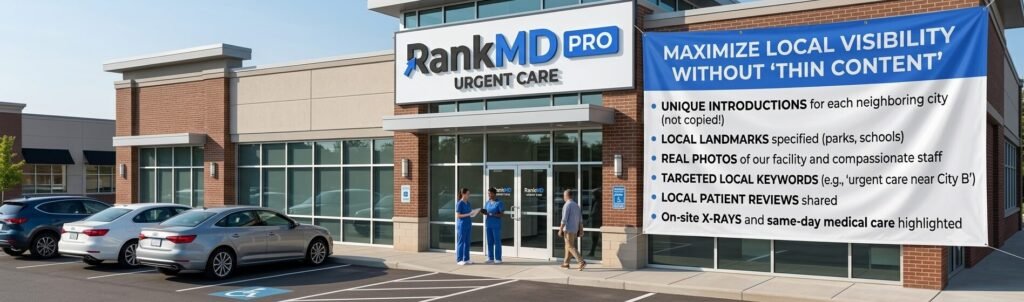
Before writing a single sentence for a new city page, take time to understand the target area. Learn about prominent landmarks, local school districts, major highways, and community hubs. Knowing these regional details allows you to write naturally and execute a strategic local SEO strategy for medical clinics that resonates with nearby residents.
Learn What Local Patients Need
Demographics vary from one town to the next. A suburban area might be filled with young families needing pediatric urgent care marketing and sports physicals, while an industrial area might have more working adults seeking occupational health SEO services or minor injury care. Tailor your messaging to reflect the specific healthcare needs of each local community.
Write a Unique Introduction
Avoid copying and pasting your intro paragraph across pages. Start each page with a fresh, welcoming hook specific to that community. Clearly explain how your clinic serves residents in that specific town, keeping your tone compassionate, simple, and direct.
Describe Your Urgent Care Services
Give prospective patients a clear overview of the conditions you treat and the medical services you offer, such as:
-
Cold, flu, and fever care
-
Sprains, strains, and minor fractures
-
Cuts, lacerations, and stitches
-
On-site digital X-rays
-
Routine physical exams and sports physicals
-
Rapid lab testing and bloodwork
-
Vaccinations and immunizations
-
Ear, eye, and sinus infections
-
Skin rashes and insect bites
-
Urgent care for urinary tract infections (UTIs)
Instead of just presenting a bulleted list, explain how these services benefit busy local families who need quick, reliable care without a long emergency room wait. Highlighting specific services is a core component of medical practice SEO.
Mention Nearby Areas
Patients frequently search using surrounding neighborhood names or well-known subdivisions. Include subtle references to neighboring communities and business districts around the target city. This helps search engines understand the geographical reach of your clinic while expanding your geo-targeted keywords for urgent care.
Add Local Landmarks
Integrating well-known landmarks gives your page immediate local context and signals authenticity to Google search algorithms. Try referencing:
-
Popular local parks and recreation centers
-
Major shopping malls or plazas
-
Nearby public or private schools
-
Regional hospitals or medical complexes
-
Busy intersections and major highways
Explain Why Patients Choose Your Clinic
Give local residents clear reasons to choose your clinic over other healthcare options in the region. Highlight patient-first features that drive urgent care patient acquisition:
-
Convenient walk-in availability with no appointment needed
-
Minimal wait times compared to local hospital ERs
-
Extended evening and weekend availability
-
Empathetic, board-certified healthcare providers
-
Comprehensive on-site diagnostics (X-rays and lab testing)
Use Local Keywords Naturally
Keywords help search engines connect your page to relevant queries, but keyword stuffing will hurt your readability and rankings. Sprinkle high-intent urgent care keywords into your content naturally, such as:
-
urgent care near [City Name]
-
walk-in clinic in [City Name]
-
same-day non-emergency care
-
minor injury treatment near me
-
urgent care clinic open today
Add Helpful Local Information
Make your page a truly useful resource by giving patients practical, real-world details they need before heading out the door:
-
Estimated drive times from popular local spots
-
Parking availability and access instructions
-
Clear walk-in policies versus online check-in options
-
Accepted health insurance plans and self-pay rates
-
Current clinic hours and holiday schedules
Create Local FAQs
Every community has questions about accessing local healthcare. Include a short FAQ section tailored to that service area. Utilizing FAQ schema for medical websites on these sections helps search engines display rich snippets in search results. Answer common questions like:
-
Do I need an appointment, or can I just walk in?
-
Are X-ray facilities available on-site at this location?
-
Which major insurance providers do you accept?
-
Do you offer pediatric urgent care for young children?
Add Real Photos
Generic stock images lower patient trust. Whenever possible, feature authentic, high-quality photos of your actual clinic, friendly medical staff, comfortable waiting areas, treatment rooms, and exterior parking facilities. Original visuals strengthen your healthcare brand awareness and reassure patients about what to expect when they visit.
Use Patient Testimonials
Social proof builds confidence and improves urgent care reputation management. Include real reviews and testimonials from patients who live in or near that specific service area. Hearing positive experiences from neighbors reassures prospective patients that they are in good hands.
Add a Strong Call to Action
Guide your visitors toward the next step with clear, direct Call-to-Action (CTA) prompts throughout the page to boost urgent care lead generation:
-
Get directions and walk in today.
-
Check current wait times online.
-
Call our medical team for immediate questions.
-
Save your spot in line now.
Link to Other Helpful Pages
Strategic internal linking for healthcare websites strengthens your site structure and helps visitors find deeper medical information. Connect your service area page to specific treatment pages like:
-
Flu & Viral Infection Treatment
-
Sports & Employment Physicals
-
On-Site Digital X-Rays
-
Lab Testing & Diagnostics
-
Insurance & Billing Information
Avoid Duplicate Content
Never copy-paste content from one service area page to another. To maintain complete originality and protect your clinic website SEO, ensure each page has a distinct:
-
Introduction and closing remarks
-
List of local landmarks and driving directions
-
Community-specific FAQs
-
Highlighted patient reviews
Keep Content Fresh
SEO is an ongoing effort, not a one-time setup. Periodically review and update your service area pages with updated hours, new medical services, fresh patient reviews, and updated clinic photos to maintain top local search rankings for walk-in clinics.
Optimize Your Headings
Break up your text using clear, descriptive subheadings (H2, H3). Organized headings allow busy patients to scan the page quickly and find the exact information they need in seconds while signaling topic relevance to search crawlers.
Improve Mobile Experience
The majority of urgent care searches happen on mobile devices by patients needing immediate care. Implementing mobile SEO for urgent care centers ensures your service area pages offer:
-
Fast page load speeds
-
Short, scannable paragraphs
-
Click-to-call phone buttons
-
Easy-to-tap map and direction links
Add Schema Markup
Implementing structured data helps search engines understand your page details accurately. Essential schema markup for medical clinics includes:
-
Medical Clinic Schema
-
Local Business Schema
-
FAQ Schema
-
Review/Rating Schema
Monitor Page Performance
Regularly evaluate how your service area pages are performing using tools like Google Analytics and Google Search Console. Keep track of key urgent care SEO performance metrics:
-
Organic search traffic and local keyword rankings
-
Phone calls and online check-ins generated
-
Bounce rate and time spent on page
-
Conversion rates from prospective local patients
Best Practices for Strong Service Area Pages
Common Mistakes to Avoid
Steer clear of these common pitfalls when executing urgent care local SEO:
-
Copying text across multiple location pages
-
Replacing only the city name on boilerplate templates
-
Stuffing pages with repetitive location keywords
-
Publishing short, unhelpful, 200-word pages
-
Omitting practical local details and directions
-
Forgetting to add internal links to core treatment pages
-
Leaving old hours or outdated insurance info online
-
Forgetting clear calls to action (like phone numbers or map links)
-
Publishing fake or unverified patient reviews
-
Neglecting mobile page speed and responsiveness
-
Final Thoughts
Well-optimized service area pages are one of the most effective ways to attract new patients from surrounding communities to your clinic. However, shortcut strategies like copying text and changing city names will hurt your long-term organic rankings.
By focusing on original content, practical local details, clear directions, and a smooth mobile experience, you build trust with patients and search engines alike.
If you are looking to scale your clinic’s online visibility with search-compliant strategies, partner with the experts specializing in urgent care SEO at Rank MD.
Frequently Asked Questions
1. Can I copy content between service area pages?
No. Copying content creates duplicate or thin content issues, which can cause Google to demote or index-suppress your pages. Every page must be uniquely written for optimal healthcare search engine rankings.
2. Should I add local landmarks to service area pages?
Yes! Referencing local roads, parks, schools, and shopping centers proves to both search engines and readers that your page is tailored specifically to that area, strengthening your local SEO signals.
3. Are patient reviews helpful for local SEO?
Absolutely. Real patient reviews build strong social proof, boost conversion rates, and provide natural, localized keywords that support medical clinic SEO.
4. Can FAQs improve local SEO performance?
Yes. FAQ sections allow you to target long-tail search queries and increase your chances of appearing in Google’s featured snippets and “People Also Ask” boxes.
5. What is the single best way to avoid thin content?
The best approach is to craft every service area page with clear, original, and practical information that directly addresses the unique needs of patients in that specific community.