A website redesign can help an urgent care center grow and succeed. A fresh look can improve page speed, build trust, and offer a much better patient experience. However, many clinics make critical errors regarding urgent care SEO during a redesign. These mistakes can drop your search engine rankings, reduce website traffic, and lead to fewer patient calls and walk-ins.
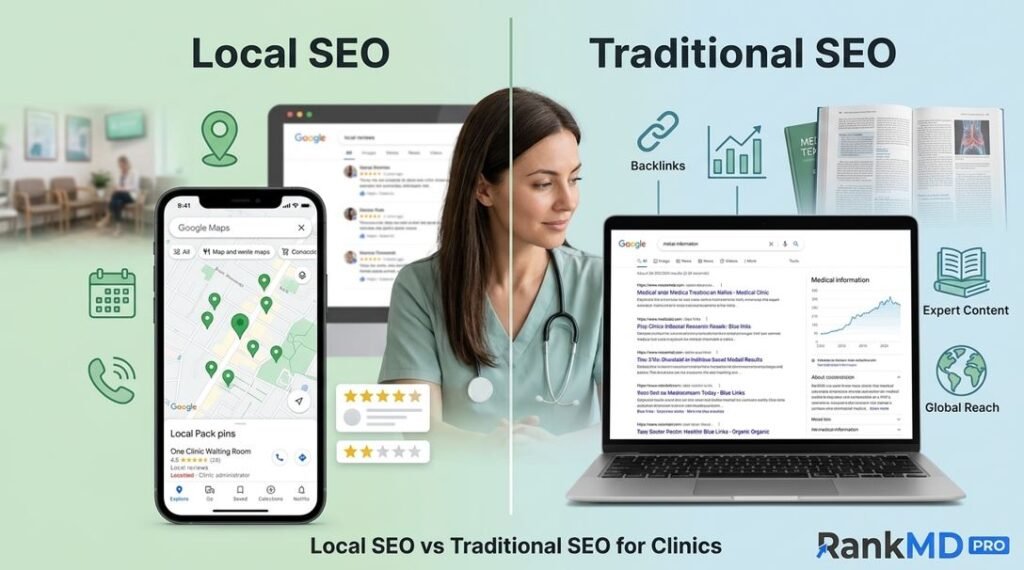
Local SEO is vital for urgent care centers, and applying proper local SEO for walk-in clinics helps retain online authority. Most patients search online before visiting a clinic. They look for nearby medical services on Google, checking reviews, clinic hours, locations, and available treatments. If a redesign harms your search engine visibility, your clinic can lose valuable patients to nearby competitors who invest in healthcare SEO strategies. In this article, we will cover the biggest local SEO mistakes urgent care clinics make during website redesigns and how to avoid them.
Why Local SEO Matters During a Website Redesign
Smart urgent care marketing SEO strategies ensure your medical center appears right when local patients need care the most. When you optimize your site properly, your facility stands out during high-intent local searches. For example, a patient in urgent need might search:
-
Urgent care near me
-
Walk-in clinic in Chicago
-
Same-day medical care near me
-
Urgent care for fever and injuries
Your website must show up at the top of search results for these terms, which relies on strong medical practice search engine optimization. A proper website redesign should boost your local rankings, not destroy them.
Common Local SEO Mistakes During Urgent Care Website Redesigns
1. Changing Website URLs Without Redirects
One of the most damaging mistakes during site migration is changing page URLs without implementing solid SEO for urgent care centers. Developers often clean up page links during a redesign, causing old URLs to disappear. For example:
-
Old URL:
[example.com/urgent-care-services](https://example.com/urgent-care-services) -
New URL:
[example.com/services/medical-care](https://example.com/services/medical-care)
Without 301 redirects, Google treats the old page as deleted, wiping out years of ranking value and clinic web presence optimization. Patients clicking old links will land on broken 404 error pages instead of getting care.
How to Fix It:
Before launching your new site, apply targeted urgent care SEO services practices:
-
Crawl and export a list of all existing website URLs.
-
Map every old URL to its corresponding new page.
-
Set up permanent 301 redirects.
-
Test every link to ensure smooth navigation.
2. Removing Important Service Pages
Clinics often delete detailed treatment pages during redesigns to make the site look minimalist, hurting their urgent care organic rankings. However, specific treatment pages attract high-intent local traffic. Key pages to keep include:
-
Flu and virus treatment
-
COVID-19 testing
-
Digital X-rays
-
Sports and employment physicals
-
Minor injury and burn care
-
On-site lab testing
-
Occupational health services
Each page ranks for specific search queries, driving patient acquisition SEO. Deleting them destroys your visibility for those medical services.
Better Approach:
Instead of deleting service pages, upgrade them with custom healthcare SEO optimization:
-
Write clear, empathetic service descriptions.
-
Add simple, helpful medical information.
-
Include clear location details and operational hours.
-
Add FAQs and easy call-to-action buttons for online check-ins.
3. Ignoring Google Business Profile During Redesign
Your website and your Google Business Profile (GBP) work together as a team to maximize your local SEO for walk-in clinics. Many clinics focus entirely on web design and forget their local listing, hurting their overall reach. Your Google profile helps local patients quickly see:
-
Physical clinic location
-
Direct phone numbers
-
Daily operating hours
-
Patient reviews and ratings
-
Driving directions
-
Facility photos
If your website details do not match your Google listing, search engines and patients lose trust, lowering your urgent care Google Maps ranking.
Keep Information Consistent:
Ensure your Name, Address, and Phone number (NAP) match perfectly across both platforms to support your local search marketing for clinics:
-
Exact clinic name
-
Physical street address
-
Local contact number
-
Accurate business hours
-
Full list of offered medical services
4. Building a Website That Is Not Mobile-Friendly
Most patients search for urgent care on mobile devices—often while traveling or dealing with a sudden illness—making mobile SEO for healthcare providers essential. A slow, poorly formatted mobile site drives patients away instantly. Effective responsive design keeps users engaged when they need immediate care.
A Good Mobile Website Should Have:
-
Lightning-fast page load speeds optimized via technical SEO for medical websites
-
Clean, simple mobile navigation menus
-
Prominent, tap-to-call phone buttons
-
Fast mobile appointment registration forms
-
Easy-to-read medical service details
5. Removing Local Keywords
Local keywords signal your exact service area to Google, which is critical for geo-targeted SEO for clinics. Removing city names and local phrases during a redesign weakens your local search presence.
-
Weak: “Urgent care services”
-
Better: “Urgent care services in Chicago, Illinois”
Smart medical center keyword strategy incorporates local phrases naturally throughout page headers, body text, and meta tags without keyword stuffing.
6. Forgetting About Existing SEO Content
Informative blog posts and educational articles build site authority over time through consistent healthcare content marketing. Deleting your blog section during a site update discards valuable organic search performance built by past efforts. High-performing topics include:
-
When should you visit urgent care vs. the emergency room?
-
How urgent care clinics treat minor sports injuries
-
What conditions can a walk-in clinic handle?
Keeping and refreshing this content maintains your domain authority, strengthening your long-term urgent care SEO campaigns.
7. Losing Patient Reviews and Testimonials
Social proof builds immediate trust and strengthens your overall clinic digital marketing SEO. Patients read reviews carefully before picking a walk-in medical facility. Removing patient feedback during a site update is a missed opportunity for converting visitors into foot traffic.
Add Reviews in Key Places:
Showcase real patient testimonials on these conversion-focused pages to improve your patient lead generation SEO:
-
The website homepage
-
Dedicated location pages
-
Individual medical service pages
-
Online scheduling and booking pages
8. Creating Poor Location Pages
Multi-location urgent care practices need unique, localized pages for every site to succeed in multi-location urgent care SEO. A common mistake is publishing duplicate location pages where only the city name changes:
-
Page A: “Urgent Care in Dallas”
-
Page B: “Urgent Care in Houston” (with identical text)
Google penalizes thin, duplicate content, making it harder for either location to rank well in local clinic search results.
Better Location Pages Include:
-
Unique written descriptions tailored for local health searches
-
Accurate Google Maps embeds and parking instructions
-
Specific local medical staff and provider details
-
Localized patient reviews and custom FAQs
9. Ignoring Website Speed
Site speed directly affects patient satisfaction and Google rankings, making performance a key part of technical SEO for medical websites. Sick or injured patients expect instant answers, and slow load times hurt your site’s usability. Implementing clean code and fast servers protects your digital user experience.
Common Causes of Slow Sites:
-
Uncompressed, heavy images impacting healthcare website speed optimization
-
Too many active website plugins
-
Unoptimized source code and scripts
-
Cheap or unreliable Web hosting
Improve Website Speed By:
-
Compressing all image files before upload to boost urgent care page speed
-
Cleaning up unused code and scripts
-
Removing unnecessary plugins
-
Upgrading to high-performance medical website hosting
10. Launching Without SEO Testing
Launching a new site without running detailed quality checks leads to traffic drops, making a pre-launch audit crucial for urgent care website redesign SEO. Common post-launch errors include broken forms, missing pages, and unindexed URLs.
Pre-Launch Audit Checklist:
-
Verify all pages load without errors for effective clinic site auditing
-
Test online booking and contact forms
-
Check tap-to-call phone buttons on mobile devices
-
Confirm all 301 redirects function correctly
-
Ensure search engine bots can index the site for proper urgent care indexation
11. Poor Page Title and Meta Description Changes
Title tags tell search engines what your pages are about, playing a major role in medical page title optimization. Changing title tags without strategic keyword research during a redesign hurts overall visibility.
-
Before: “Urgent Care Clinic in Chicago | Same-Day Medical Care”
-
After: “Home | ABC Clinic”
The revised title removes important search signals. Strategic on-page SEO for urgent care always pairs your primary service with your primary location.
12. Not Tracking SEO Performance
You cannot manage what you do not measure, which is why ongoing urgent care SEO tracking is essential after a relaunch. Tracking analytics allows you to evaluate site health, fix drop-offs, and catch unexpected traffic issues early.
Metrics to Monitor:
-
Total organic website traffic measured via clinic analytics tools
-
Local search keyword rankings
-
Inbound phone calls from the site
-
Completed appointment requests
-
Google Business Profile actions (directions, calls, clicks)
Local SEO Redesign Checklist for Urgent Care Clinics
How to Avoid SEO Problems During a Website Redesign
Follow these five simple steps to protect your online visibility:
-
Audit Your Current Website: Identify your highest-ranking pages, top keywords, and overall conversion performance before touching any code to establish a baseline for healthcare SEO performance.
-
Plan SEO Before Building: Involve an experienced urgent care SEO agency early in the wireframing phase rather than trying to fix broken search issues after launch.
-
Protect Existing Rankings: Retain high-performing content structures and map out redirects for changed URLs to preserve your hard-earned urgent care search authority.
-
Test Thoroughly Before Launch: Run comprehensive technical and mobile usability checks on a staging environment to ensure full healthcare website compliance.
-
Monitor Performance Post-Launch: Keep a close eye on search rankings, indexing status, and conversion rates immediately after going live using structured clinic SEO monitoring.
Final Thoughts
A website redesign is a powerful way to modernize your medical practice and improve patient trust. However, poor technical planning can severely damage your local search rankings. The biggest mistakes include deleting high-value service pages, missing redirects, neglecting your Google Business Profile, and failing to optimize for mobile users.
Protecting your existing search authority while improving patient experience ensures your new site succeeds. Done correctly, a redesigned website backed by strong urgent care SEO will attract more local patients, increase appointment bookings, and grow your clinic.
If you are looking for specialized urgent care SEO services to grow your practice and protect your rankings during a redesign, partner with experts who understand healthcare search strategy.
Frequently Asked Questions (FAQs)
1. Why are location pages important for urgent care clinics?
Location pages help local patients find the clinic closest to them. They provide essential geographic signals to Google, making your facility appear higher in map packs and local search results driven by targeted location-based healthcare SEO.
2. Should urgent care websites have dedicated service pages?
Yes. Dedicated service pages allow clinics to rank for specific search queries like “x-rays near me” or “flu treatment walk-in,” utilizing precise medical service keyword optimization to bring in qualified patients seeking targeted care.
3. Does website speed affect local SEO for clinics?
Yes. Page speed is an official Google ranking factor. A fast website offers a better user experience, lowers bounce rates, and helps maintain top positions under modern healthcare technical SEO standards.
4. Should urgent care clinics track SEO performance after a redesign?
Yes. Monitoring traffic and conversion data post-launch through structured post-redesign SEO tracking helps catch technical bugs early, ensures redirects are working, and tracks patient growth.
5. Can removing blogs hurt an urgent care site’s SEO?
Yes. Deleting educational blog content removes indexed pages, lowers overall domain authority, and reduces the long-tail search queries your site can rank for in medical blog content marketing.